Certificates are an important part of online training, professional education, compliance programs, and certification courses. For organizations using WordPress, however, certificate management can become complicated when the certificate system is tightly connected to a particular Learning Management System (LMS).
RAVEN Certificate Builder provides a different approach. It operates as an independent WordPress certificate plugin that can work with LearnDash, RAVEN LMS, and other supported WordPress LMS platforms. This allows organizations to manage certificate design, issuance, verification, expiration, and credential records separately from the LMS responsible for delivering courses.
How the Certificate Builder Works with an LMS
The basic architecture is straightforward.
Your LMS manages the learning process, including courses, lessons, learners, enrollment, progress, and completion requirements. Raven Certificate Builder manages the credential side of the process.
When a learner satisfies the configured completion requirements in a supported LMS, the certificate system can issue the appropriate credential. Administrators can also issue certificates manually when necessary.
This separation can be particularly useful for organizations that operate multiple training programs or expect their LMS environment to change over time.
Using Raven Certificate Builder with LearnDash
LearnDash users can integrate Raven Certificate Builder into their existing WordPress training environment without replacing LearnDash.
A typical implementation follows these steps:
1. Install and Activate Raven Certificate Builder
Install the plugin on the WordPress website running LearnDash and activate the product license.
Raven Certificate Builder is designed as a standalone WordPress plugin, so the certificate management layer remains separate from the LearnDash course engine.
2. Create Your Certificate Template
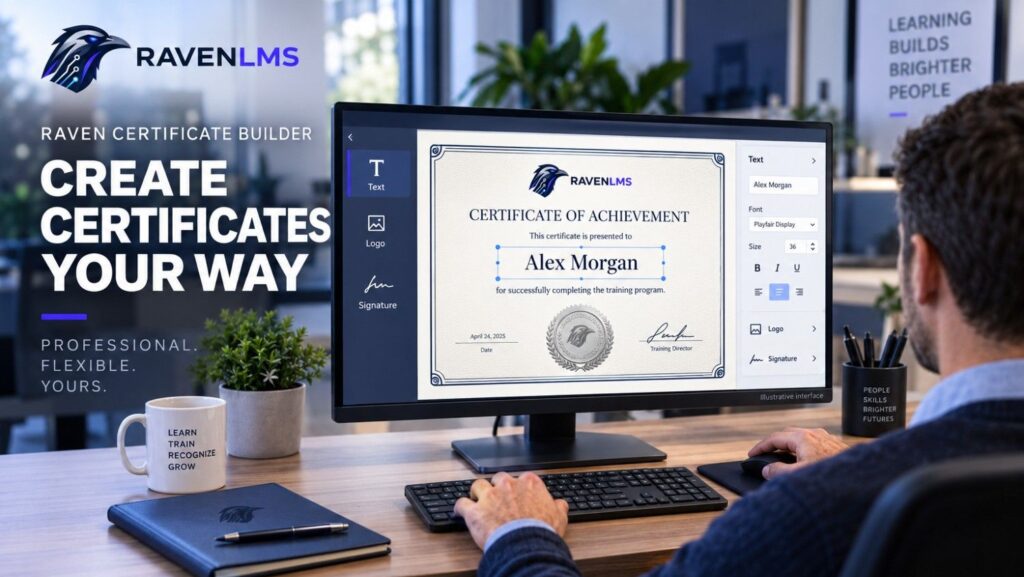
Use the visual certificate builder to develop a certificate that matches your organization’s branding.
A professional certificate can include elements such as:
- Organization name and logo
- Certificate title
- Learner name
- Course or certification name
- Completion date
- Issue date
- Unique certificate ID
- Authorized signatures
- Background graphics
- Additional credential information
The builder supports flexible positioning of text and images as well as portrait and landscape certificate formats.
3. Add Dynamic Learner and Course Information
Instead of creating a separate certificate for every learner, administrators can use dynamic information within the certificate template.
Learner, course, completion, and certificate information can then be inserted when the credential is generated.
This makes the certificate template reusable across large numbers of learners while maintaining individualized credentials.
4. Connect Certificate Issuance to LearnDash
The next step is to associate the appropriate certificate with the relevant LearnDash completion workflow.
LearnDash continues to determine whether the learner has completed the required training. Raven Certificate Builder then handles certificate generation and credential management through its LearnDash integration.
This separation keeps the learning and credential workflows organized while allowing administrators to maintain greater control over certificates.
5. Test the Complete Learner Workflow
Before making the certificate available to all learners, test the process with a sample account.
Complete the applicable LearnDash course and verify that:
- The correct certificate is issued
- Learner information appears properly
- Course details are accurate
- Completion and issue dates are correct
- The certificate ID is generated correctly
- The certificate can be downloaded or printed
- Public certificate verification works as intended
Testing is especially important when several courses use different certificate templates or completion requirements.
Managing Certificate Verification
Issuing a certificate is only part of professional credential management. Organizations also need a way for employers, customers, partners, or other third parties to confirm whether a credential is valid.
Raven Certificate Builder supports unique certificate IDs and public certificate verification. Issued credentials can be maintained through a centralized certificate registry, allowing organizations to manage their certificate records beyond initial issuance.
This is useful for professional certification programs where credential authenticity may need to be checked months or years after training has been completed.
Handling Expiration, Revocation, and Restoration
Some credentials remain valid indefinitely, while others require renewal.
Raven Certificate Builder supports certificate expiration as well as certificate revocation and restoration.
For example, a compliance training organization could issue a certificate valid for a defined period. If a credential later becomes invalid, its status can be managed without deleting the historical certificate record.
This provides a stronger credential-management model than simply generating a downloadable PDF.
Using Raven Certificate Builder with Other WordPress LMS Platforms
One of the important architectural advantages of Raven Certificate Builder is that it is not designed exclusively around a single LMS.
It can operate with:
LearnDash + Raven Certificate Builder
or
RAVEN LMS + Raven Certificate Builder
and its architecture is designed to support additional WordPress LMS platforms through dedicated integrations.
For organizations managing multiple LMS installations, this can provide a more consistent certificate strategy.
Rather than designing completely different credential systems for every LMS, administrators can maintain a centralized approach to certificate branding, issuance, verification, and credential administration.
Manual Certificates Are Also Useful
Not every credential needs to originate from an LMS completion event.
Raven Certificate Builder also supports manual certificate issuance.
This can be useful for:
- Instructor-led training
- Classroom programs
- Workshops
- Conferences
- Continuing education activities
- Previously completed training
- Imported learner records
- Administrative exceptions
Organizations can therefore use the same certificate management environment for both LMS-based and externally completed training.
Why an LMS-Independent Certificate System Matters
Separating credentials from the underlying LMS can provide significant operational flexibility.
Organizations sometimes migrate from one LMS platform to another, operate multiple WordPress training sites, or maintain different platforms for separate audiences. When certificate management is completely dependent on one LMS, changing the learning platform can also affect credential workflows.
With an independent certificate layer, the LMS focuses on learning while the certificate platform focuses on credentials.
This approach can make it easier to maintain consistent branding, verification processes, certificate records, and credential policies across different training environments.
Build a More Professional WordPress Certification Experience
LearnDash already provides a strong foundation for managing WordPress-based courses and learner progress. Adding a dedicated credential management layer can extend that environment for organizations that require more control over professional certificates.
Raven Certificate Builder combines certificate design, automated and manual issuance, unique certificate identification, verification, expiration management, revocation, downloading, printing, and credential sharing within WordPress.
For training companies, universities, corporate learning teams, professional associations, continuing education providers, and certification organizations, it provides a practical way to manage credentials while remaining flexible about which LMS powers the learning experience.
Explore RAVEN Certificate Builder and build a more flexible certificate and credential management workflow for your WordPress LMS.