Moving from LearnDash to a new learning management system can create understandable concern. Your courses may be valuable, but the learner history behind them is often even more important. Student accounts, enrollments, completed lessons, exam attempts, certificates, and progress records may represent years of training activity.
A poorly planned migration can reset learner progress, disconnect users from courses, create duplicate accounts, or leave administrators rebuilding records manually. A controlled migration to Raven LMS, however, can protect learning continuity while giving your organization an opportunity to simplify its WordPress LMS environment.
This guide explains how to plan a LearnDash-to-Raven LMS migration, identify the data that must be protected, test the transition safely, reduce unnecessary plugin bloat, and control the long-term cost of operating your LMS.
Why Organizations Consider Moving from LearnDash
LearnDash is widely used for delivering courses through WordPress. As learning operations grow, however, organizations may begin adding separate plugins for certificates, reporting, learner dashboards, communications, security controls, analytics, payments, assessments, and other administrative requirements.
The result can be a fragmented LMS environment with multiple settings panels, renewal dates, compatibility dependencies, and support channels. Even when the site continues working, administrators may spend more time maintaining the platform than improving the learner experience.
Organizations often consider Raven LMS when they want a more connected platform for courses, lessons, exams, certificates, learner dashboards, reporting, progress tracking, and training administration. You can review the broader platform capabilities on the Raven LMS features page or explore the complete product tour.
The objective of migration should not be to copy every part of an overloaded plugin stack. It should be to preserve essential learning records while creating a cleaner and more manageable LMS foundation.
Can You Migrate Without Losing Student Progress?
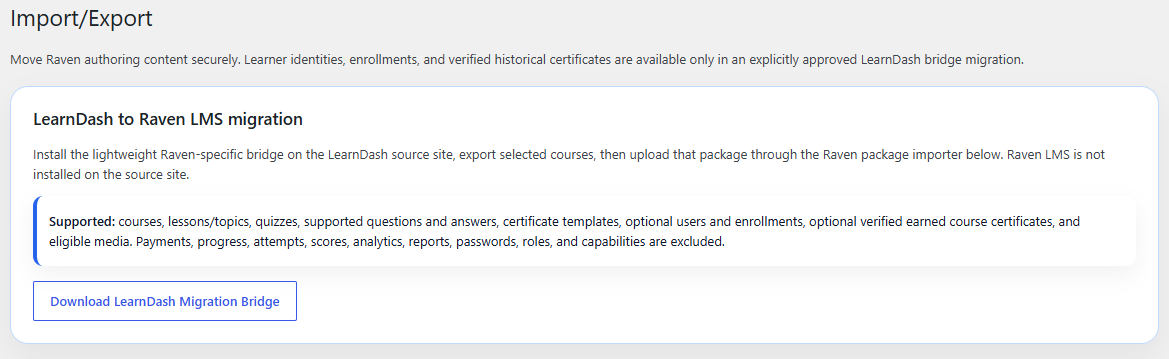
Yes, but learner progress should never be treated as a simple content import.
Courses, lessons, quizzes, users, enrollments, progress records, certificates, purchases, and custom metadata may be stored differently across plugins and extensions. The exact migration requirements therefore depend on how your LearnDash site was configured.
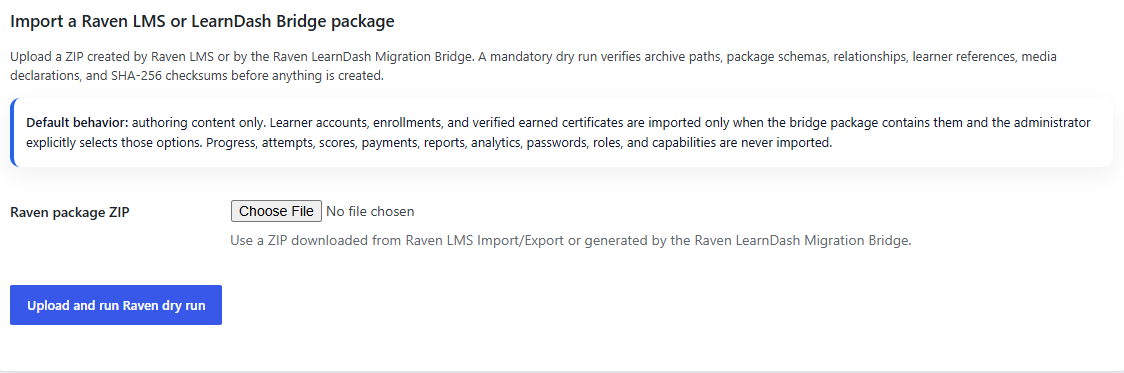
Raven LMS provides a migration importer foundation for LearnDash-style course, lesson, and quiz structures. However, a professional migration should begin with an audit rather than an assumption that every customized record will transfer through a single click.
The safest migration strategy is to map, test, compare, and validate every critical learner relationship before changing the production site.
LearnDash also distinguishes between transferring course content and transferring learner progression. Its own migration documentation notes that some migration workflows may move lessons, topics, quizzes, and questions without moving progress records. Administrators should review the LearnDash migration documentation when evaluating source data.
What Must Be Protected During Migration?
A successful LMS migration is measured by learner continuity, not only by the number of courses imported. The following records should be reviewed before the transition begins.
Student Accounts
Learner names, email addresses, usernames, WordPress user IDs, roles, and profile data form the foundation of the migration. Existing users should be matched carefully to avoid duplicate accounts or disconnected learning histories.
Course Enrollments
Every learner must remain connected to the correct courses. Enrollments may have been created through direct assignment, group membership, WooCommerce purchases, subscriptions, memberships, bulk enrollment tools, or custom integrations.
Before migration, document how each enrollment type is created and whether it remains active, expires, or depends on an external system.
Lesson and Course Progress
Progress data may include completed lessons, completed topics, percentage completion, course status, completion dates, prerequisite status, and the learner’s last recorded position.
A learner who completed eight of ten lessons should not return after migration and find the course reset to zero. Likewise, a completed course should remain completed unless your organization intentionally changes the requirement.
Exam and Quiz Records
Assessment information may include scores, pass or fail outcomes, submission dates, attempt counts, remaining attempts, manually reviewed responses, and security events.
Determine which historical assessment records must remain operational and which can be retained in an archive. Certification and compliance programs may require more extensive history than general course sites.
Certificates
Certificates may represent professional achievement, continuing education, internal authorization, or compliance evidence. Your migration plan should identify:
- Which learners already earned certificates
- Whether original issue dates must be preserved
- Whether existing certificate files must remain available
- How future eligibility will be calculated
- Whether certificates will be regenerated in Raven LMS
- Whether certificate expiration or renewal rules apply
Raven LMS includes certificate eligibility, certificate records, verification, and renewal-oriented capabilities. These features can be reviewed through the platform feature overview.
Purchases, Memberships, and Access Rules
A LearnDash enrollment may depend on WooCommerce, a membership plugin, a subscription, a manual payment, or custom code. Migrating the course without understanding the commercial relationship could leave a learner enrolled incorrectly or unable to access purchased training.
Reports and Historical Records
Some organizations only need current learner status. Others must retain historical records for audits, contracts, workforce reporting, continuing education, or regulatory obligations.
Separate operational data from archived evidence before deciding what must be imported into the active Raven LMS environment.
Step 1: Audit the Existing LearnDash Site
Begin by documenting the current LearnDash environment. Do not start the migration until you understand the real scope of the site.
Your audit should include:
- Total courses, lessons, topics, quizzes, and questions
- Total users, active learners, and inactive accounts
- Course enrollment methods
- Partially completed and fully completed courses
- Exam attempts and passing records
- Issued and eligible certificates
- Groups, group leaders, instructors, and managers
- WooCommerce, membership, or subscription connections
- Custom user fields and metadata
- LearnDash add-ons and third-party extensions
- Custom themes, templates, shortcodes, and code
- Reporting, analytics, and external integrations
This inventory establishes what must be transferred, what can be archived, and what should be retired.
Step 2: Create a Complete Backup
Never begin an LMS migration without a verified backup of both the WordPress database and site files.
The database contains users, settings, learning records, post data, and plugin information. The site files contain plugins, themes, media, configuration files, and uploaded course resources. Both are required for a complete recovery plan.
The official WordPress backup documentation explains why the database and files should be treated as one coordinated backup set.
Before continuing, confirm that:
- The backup completed without errors
- The database export is available
- The WordPress files and uploads are included
- The backup is stored outside the production server
- The restoration procedure is understood
- An authorized person can approve a rollback
Step 3: Clean the Source Environment
A migration is an opportunity to improve the LMS rather than carry every historical problem into the new platform.
Review the LearnDash site for:
- Duplicate learner accounts
- Abandoned test courses
- Unused quizzes and question banks
- Expired administrators or instructors
- Broken media links
- Obsolete certificates
- Unnecessary add-ons
- Old staging data
- Incomplete course drafts
- Expired or invalid enrollments
Do not delete production information casually. Create the backup first, document cleanup decisions, and keep archived data when business or compliance requirements demand it.
Step 4: Build a Migration Map
A migration map defines how each LearnDash record will be represented in Raven LMS. It gives administrators and developers a testable reference rather than relying on memory.
| LearnDash Record | Raven LMS Destination | Required Validation |
|---|---|---|
| WordPress user | Learner account | Match user ID, email, role, and status |
| Course | Raven LMS course | Verify title, status, access, and structure |
| Lesson or topic | Course lesson structure | Confirm hierarchy, order, and content |
| Enrollment | Course assignment | Confirm learner access and source |
| Lesson completion | Learner progress record | Verify completed lessons and dates |
| Course completion | Completion history | Preserve status and completion date |
| Quiz result | Exam record or archive | Confirm score, outcome, and attempts |
| Certificate status | Certificate eligibility or history | Verify issue date and credential status |
| Group membership | Group or department relationship | Confirm manager and learner assignment |
The mapping process is particularly important for customized LearnDash environments because third-party plugins may store related records outside the primary LearnDash structures.
Step 5: Create a Staging Environment
The first migration attempt should never occur on the live production site.
Create a staging environment that reflects the active site’s WordPress version, database, plugins, theme, media, and LMS configuration. This gives your team a safe place to test imports, inspect relationships, and repeat the migration without affecting learners.
LearnDash itself recommends using a staging site when testing plugin or theme conflicts. Its troubleshooting guidance also advises creating a recent backup before disabling plugins or changing major site components.
In staging, administrators should be able to:
- Preview imported course structures
- Inspect lesson ordering and media
- Compare learner assignments
- Validate partial progress
- Review completed course records
- Test exam and certificate behavior
- Identify unsupported customizations
- Repeat the migration after corrections
Raven LMS describes its migration approach as a safe, draft-based foundation for LearnDash-style content structures. Review the current capabilities in the Raven LMS documentation before planning the production cutover.
Step 6: Test Representative Learner Accounts
Do not validate a migration by reviewing only one administrator account. Select learners whose histories represent different conditions.
Your sample should include:
- A learner who has not started a course
- A learner with partial progress
- A learner who completed a course
- A learner who passed an exam
- A learner who failed an exam
- A learner with multiple exam attempts
- A learner with an earned certificate
- A learner enrolled in several courses
- A learner with expired access
- An instructor, group leader, or manager
Compare each account before and after migration. The learner should retain the correct identity, enrollments, progress, results, and credential status unless a documented change was intentionally approved.
Step 7: Reconcile the Data
After the test migration, compare totals between LearnDash and Raven LMS.
Review at least the following:
- Total learner accounts
- Total courses and lessons
- Total active enrollments
- Total partially completed courses
- Total completed courses
- Total exam attempts
- Total passing and failing outcomes
- Total issued certificates
- Total certificate-eligible learners
- Total groups or departments
Matching totals do not guarantee that every relationship is correct, but mismatched totals quickly identify areas that need investigation.
For example, matching user counts with lower enrollment counts may indicate that learner accounts transferred successfully while course assignments did not.
Step 8: Plan the Final Cutover
Learners may continue completing courses after the staging migration. The production cutover must therefore capture activity created between the test import and the final transition.
A controlled cutover normally includes:
- Announce the maintenance period.
- Temporarily pause new learning activity if required.
- Create a final backup of files and the database.
- Capture the latest users, enrollments, and progress records.
- Run the approved migration process.
- Reconcile critical totals.
- Test learner login and course access.
- Test progress updates, exams, and certificates.
- Open Raven LMS to learners.
- Monitor activity and support requests.
Schedule the transition during a period of low learner activity whenever possible.
Step 9: Keep a Rollback Plan
A rollback plan is not an expectation of failure. It is a basic control for protecting a production learning operation.
The plan should identify:
- The location of the final backup
- The process for restoring LearnDash
- The person authorized to approve rollback
- The acceptable migration downtime
- The validation failures that would trigger rollback
- The learner communication process
- The period during which the original system will remain available
Do not uninstall LearnDash or delete its data immediately after launch. Keep the original environment protected and available until the Raven LMS deployment has passed final review.
Use Migration to Reduce WordPress LMS Bloat
Migration should not recreate every existing plugin dependency automatically.
Many LearnDash sites accumulate separate tools for certificates, reporting, learner profiles, exam security, communication, progress visualization, analytics, and administrative workflows. Each tool may be useful individually, but the combined stack can increase complexity.
Too many overlapping components may contribute to:
- More plugin updates
- Higher risk of compatibility conflicts
- Duplicate database activity
- More settings for administrators to manage
- Inconsistent user interfaces
- More technical troubleshooting
- Multiple annual license renewals
- Greater dependence on different vendors
Raven LMS brings courses, lessons, exams, certificates, learner dashboards, reporting, progress records, gamification, messaging, and other LMS functions into a more connected WordPress platform.
This does not mean that every site will become faster simply by changing plugins. Performance also depends on hosting, database condition, media, theme quality, caching, traffic, and custom code. However, reducing unnecessary plugin overlap can make the LMS easier to maintain, troubleshoot, and optimize.
Calculate the Real Cost of Your LMS
The purchase price of an LMS plugin is only one part of its total cost of ownership.
Organizations should also consider:
- Premium add-on subscriptions
- Certificate and reporting extensions
- Third-party exam or security tools
- Membership and integration costs
- Developer maintenance
- Compatibility troubleshooting
- Administrative time
- Custom reporting work
- Renewal management
- Support across multiple vendors
Raven LMS uses annual site-based plans, and its current packages include the core platform and bundled add-ons. Organizations can review available packages on the Raven LMS pricing page.
The potential saving is not limited to plugin fees. A more connected system may reduce the time required to manage extensions, investigate conflicts, prepare reports, control learner records, and coordinate support across different providers.
Communicate the Change to Learners
Learners do not need every technical detail, but they do need clear expectations.
Your migration announcement should explain:
- The date and time of the transition
- Whether temporary downtime is expected
- Whether the website address will change
- Whether existing login credentials will continue working
- That courses and progress are being protected
- Where learners can request support
- What improvements they can expect
Clear communication reduces uncertainty and prevents a new interface from being mistaken for missing data.
Post-Migration Validation Checklist
Before declaring the migration complete, confirm that:
- Administrators can access Raven LMS
- Learners can log in successfully
- Users see the correct assigned courses
- Partially completed courses retain progress
- Completed courses remain completed
- Lesson completion updates correctly
- Exam attempts and limits behave as expected
- Certificate eligibility is accurate
- Required historical records remain accessible
- Emails and notifications are delivered
- Payments and enrollment workflows function correctly
- Reports show expected totals
- Managers and instructors have correct permissions
- Performance and error logs have been reviewed
- The rollback backup remains available
Common LearnDash Migration Mistakes
Migrating Directly on the Live Site
Testing imports on production creates unnecessary risk. Use staging first and repeat the process until the results are predictable.
Assuming Content Migration Includes Progress
Course content and learner history are different data sets. Verify progress, enrollment, assessment, and certificate records separately.
Checking Courses but Ignoring Learners
A course can look correct while its learners, progress records, and access rules remain incomplete.
Removing LearnDash Too Early
Retain the original environment until the migration has been validated and formally approved.
Rebuilding the Same Plugin Sprawl
Review whether each add-on remains necessary. Migration is an opportunity to simplify the LMS architecture.
Skipping Post-Launch Monitoring
Monitor logins, lesson completion, exams, certificate eligibility, payment activity, and system errors closely after launch.
Frequently Asked Questions
Will Raven LMS automatically transfer every LearnDash record?
No responsible migration should assume that every record from every customized LearnDash site can be transferred automatically. Course structure, user data, progress, certificates, commerce relationships, and third-party metadata should be audited and tested individually.
Can students keep their existing WordPress accounts?
In many migrations, the existing WordPress user accounts can be retained because both systems operate within WordPress. However, user IDs, roles, emails, statuses, and LMS relationships must still be validated.
Will completed learners need to take their courses again?
They should not need to repeat completed training when completion records are mapped and validated correctly. Test completed learner accounts before the production launch.
Can existing LearnDash certificates be preserved?
Existing certificate records can be retained, archived, or mapped into a new credential workflow depending on how they were originally generated. Decide whether original files, dates, verification records, and renewal rules must be maintained.
How long does a LearnDash migration take?
The timeline depends on the number of courses and learners, the complexity of progress records, third-party integrations, custom code, certificate requirements, and the amount of testing required. A small standard site may be easier to migrate than a heavily customized certification platform.
Should LearnDash be removed immediately after migration?
No. Keep the original system and its backup available until Raven LMS has completed production validation and the migration has been formally accepted.
Move from LearnDash with Greater Confidence
Migrating from LearnDash to Raven LMS does not have to mean rebuilding your entire learning operation or asking students to start over.
With a complete audit, reliable backups, clear data mapping, staging tests, learner-level validation, controlled cutover, and rollback preparation, your organization can protect critical student records while moving toward a more connected LMS environment.
The transition can also provide value beyond data preservation. It is an opportunity to reduce unnecessary plugin dependencies, simplify administration, improve visibility, and create a more predictable foundation for training and certification programs.
The best migrations are nearly invisible to learners. They sign in, find their assigned courses, continue from their previous position, and experience a cleaner platform around them.
Ready to evaluate your migration options? Review the Raven LMS product tour, explore the documentation, or request a Raven LMS demonstration to discuss your WordPress learning environment.